Forum Replies Created
-
AuthorPosts
-
 MikhailModerator
Hi,
After uploading the project, writing rights on the log folder often disappear.
If you provide writing access for all on this folder, I expect that log will be created. This is a known issue, it is fixed in the v6.
Hope to catch a error with details.Is v6 in beta now ?
Yes. It’s available. But currently not all modules have been ported.
Is there any compile guide for dotnet-core noobs?
A guide will be created later. In short, switch to Release configuration before build. Build *Common projects first. VS 2022 Community is OK.
MikhailModeratorTry
var myFilter = new scada.CnlFilter(); myFilter.cnlNums = [1, 2, 3, 4]; myFilter.viewIDs = [1, 1, 1, 1]; // ID of the view containing the above channels scada.clientAPI.getCurCnlDataExt(myFilter, function (success, cnlDataExtArr) {...MikhailModeratorHi,
Yes. You can set the default scheme scaling in the Webstation configuration file. See the link . This file is in Rapid SCADA project.MikhailModeratorHello,
Please check RAM consumption.
Are there any errors in /opt/scada/ScadaWeb/log/ScadaWeb.log?Mono is not stable enough. For this reason, we use .NET6 instead of Mono in Rapid SCADA 6. The Grafana plugin has not be ported yet. When we do that, you could update.
MikhailModeratorHello,
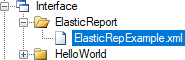
When a report is just created, its file is located inside the project like shown here https://rapidscada.net/doc/content/latest/en/modules/plg-elastic-report-files/report_itf_file_en.pngAfter you send the project to the runtime by clicking the upload button, the report configuration file should be located in C:\SCADA\Interface
Do you have such file?
MikhailModeratorcnlFilter is an instance of scada.CnlFilter class.
MikhailModeratorHello,
Please check the error details in the log C:\SCADA\ScadaWeb\log\ScadaWeb.log
Looks like the report configuration file is not uploaded.MikhailModeratorPractical examples are the existing plugins that uses that API.
Please check PlgTable. LinkMikhailModeratorGood 🙂
MikhailModeratorHi,
It’s recommended to prepare a scheme background, containing lines, circles and other graphical primitives, using a 3rd party image editor. Then save to SVG and insert in your scheme by Scheme Editor.
MikhailModeratorUse getCurCnlDataExt
MikhailModeratorIn the Server settings the Domain controller field is used for checking user names and passwords by Active Directory. Also ModActiveDirectory module should be activated.
It’s not recommended to change TCP port which is used for data exchange between Server, Communicator and Webstation apps. The default port is 10000.
MikhailModeratorIf the required value is array, you should set an array length.
Channel names entered in the configuration database have no effect how Communicator reads data from the OPC server.Does the OPC manufacturer support OPC UA standard? OPC DA is outdated.
I also have doubts about the ability of Rapid SCADA to communicate by standard DNP3 or IEC-60870-5/-104 with RTUs
You need a 3rd party OPC server to use the mentioned protocols.
-
AuthorPosts