Forum Replies Created
-
AuthorPosts
-
 MikhailModerator
Password here is encoded.
AutoAccept = true
ConfigFileName = DrvDsOpcUaServer.xml
DeviceFilter =
Password = B9D0F030265751578B00E9801C69320C
Username = opc
MikhailModeratorBy default
Username: opc
Password: scada
You can change them using the data source properties form.MikhailModeratorHi,
Possibly, a scheme size may be the cause of the issue. If your page is available online, I can check it.MikhailModeratorRedundancy is a big topic.
In short, you could deploy 2 Rapid SCADA servers that poll the devices in parallel independently. This would be the simplest way.More complex solution can synchronize data between 2 Rapid SCADA servers.
MikhailModeratorYou can create several archives, and assign archives to the channels.
MikhailModeratorHello,
Please provide additional info:
1. What Rapid SCADA version do you install?
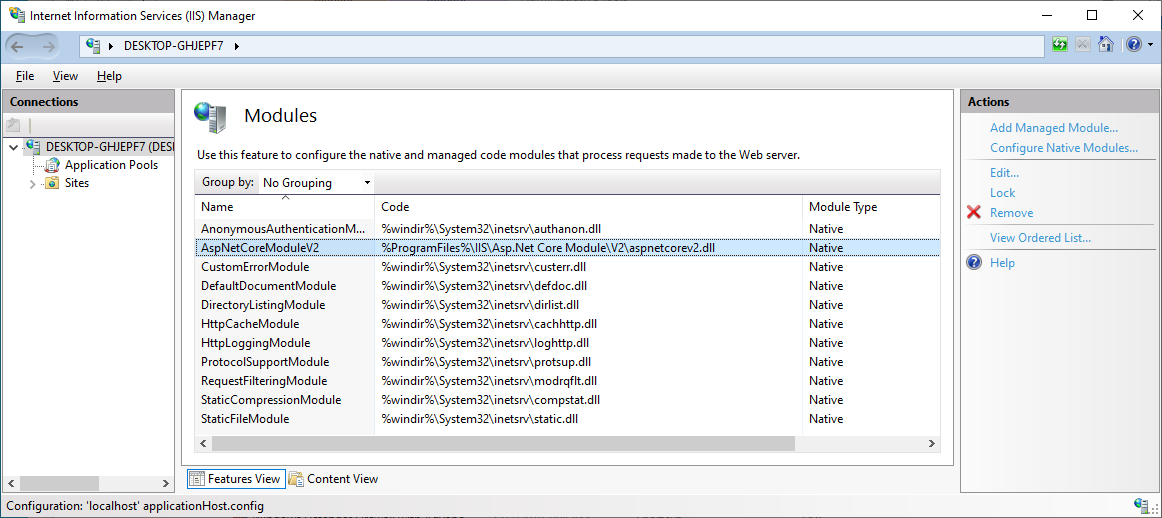
2. What is the OS version?Check that AspNetCoreModuleV2 is installed as shown here.
MikhailModeratorHi,
I recommend to check that AspNetCoreModuleV2 is installed:
https://rapidscada.net/docs/en/latest/installation/install-windows
The web application is executed by IIS, you should not be started manually.MikhailModeratorHi,
Can you reproduce this issue on https://rapidscada.net/scada/ ?
If your page is available online, I can check.MikhailModeratorHi,
You should check the web application log, ScadaWeb.log, for the details.MikhailModeratorHi,
What version of Rapid SCADA do you use?
Did you check ScadaWeb.log?MikhailModeratorwould it be possible to modify the table view and make a version that displays daily data?
It may be possible in the future, but there is no such task in our road map 2024.
MikhailModeratorHi,
Table views are designed for displaying hourly data.
I suppose, to display daily data you should try Elastic Report plugin. It’s documentation is here.The idea is the following:
1. Configure an elastic report as you need.
2. A report can be displayed as a web page accessed by a certain URL. URL arguments can be modified to display last 7 or 10 days relatively.
3. Add an URL in the Views table to add a node in the view explorer tree.Ask for details of each step if needed.
MikhailModeratorHi,
This is very old version of ScadaAdmin that uses MSSQL compact database. Just skip it.MikhailModeratorHi,
To run and debug the project you should manually copy the compiled files to the same locations which is used when you install Rapid SCADA from the distributive. This is because the compilation results of several projects is needed to run Rapid SCADA applications. -
AuthorPosts