Forum Replies Created
-
AuthorPosts
-
September 21, 2022 at 7:20 am in reply to: How to manage MQTT JSON data from Rapid Scada version 6 beta #10850
 MikhailModerator
How can I update to the new release keeping all of my settings ?
– Make a backup of your Rapid SCADA project
– Upgrade Rapid SCADA
– Upload the existing project
– Check for errorsMikhailModeratorThank you too!
September 20, 2022 at 12:15 pm in reply to: How to Install Automatic Control Module in Raspberry PI #10841MikhailModeratorHi,
Does the file /opt/scada/ScadaServer/Log/ModAutoControl.log exist?
Are there any errors in ScadaServerSvc.log on the service start?MikhailModeratorEvents are created automatically by the Server application depending on channel properties. You should set event checkboxes for the channel. Events are stored in the event archive, located by default in C:\SCADA\ArchiveDAT\Events
MikhailModeratorChannel formula example for the calculated channel:
Val(101); Stat(101)
where 101 is the source input channelMikhailModeratorOnly can access OPC UA server anonymously
The issue in DrvOpcUa has been fixed. Thank you for finding it.
Do you prefer building the source code by yourself or should I provide an updated DLL?MikhailModeratorHowever, if you have to provide only 2 registers per device as Modbus Slave, I will help you. In this case you should create a new Modbus template, and add a bunch of channels of the Calculated type to make a device mapping.
-
This reply was modified 3 years, 7 months ago by
 Mikhail.
MikhailModeratorHi,
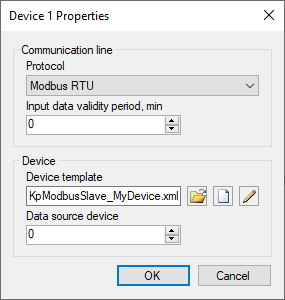
In the Modbus Slave driver of version 5.x I strongly recommend to provide fully the same registers as they are. Providing only particular registers may be too tricky. We will simplify driver settings in the 6 version, so you can choose registers when it is ready.You should add 4 Modbus Slave devices. Specify for them the same Modbus template that you use for master, and set Data source device equal to master devices’ IDs (> 0).
https://rapidscada.net/doc/content/latest/en/modules/kp-modbus-slave-files/device_props_en.pngSeptember 19, 2022 at 7:15 am in reply to: How to manage MQTT JSON data from Rapid Scada version 6 beta #10828MikhailModeratorHi,
Check server log for errors.
MikhailModeratorThe formula
Cnl; Cnl > 0 ? 15 : CnlStatdoes not contain particular channel number. It’s applied to the channel of the formula.15 is a channel status. You can see channel status IDs in the Event types table.
MikhailModeratorAccording to the manual there is no difference. They are the same.
MikhailModeratorI will check.
September 18, 2022 at 9:26 am in reply to: How to Install Automatic Control Module in Raspberry PI #10808MikhailModeratorHi,
You should copy the files to the Linux machine and to the Windows machine. Activate the module in the project. You will find the computer code in the module log on Linux.
-
This reply was modified 3 years, 7 months ago by
-
AuthorPosts