Forum Replies Created
-
AuthorPosts
-
 MikhailModerator
Then vice versa, delete /opt/scada/ScadaServer/Mod/Mono.Security.dll and restart the Server daemon.
MikhailModeratorTry the following:
1. Download Mono.Security.dll.zip.
2. Put the DLL into /opt/scada/ScadaServer/Mod
3. Restart the Server daemonMikhailModeratorTo get quick results with export data to PostgreSQL, it would be useful to involve our team in the project. We can help to fix the export process, and upgrade the export module if necessary depending on the requirements.
MikhailModeratorshow realtime data on a chart contionously, without refreshing the webpage?
We work on it now. Coming soon ))
You can contact us by email to get early version for testing.We are trying to build up a system based on Rapid SCADA to design a mass ventilator system for treatment of group illnesses, specifically to COVID19.
Wow
MikhailModeratorHello Roland,
Unable to enqueue current data. The maximum size of the queue 100 is exceeded
2 main possible reasons:
1. Query is too slow comparing with the amount of incoming data
2. There is a database error.You should analyze the log ModDBExport.log written by the DB export module. You could provide the log here.
MikhailModeratorHello,
The project DemoProject.en-GB.rsproj requires Modbus device or Modbus simulator. Watch the video.
MikhailModeratorSet the formula of the output channel like the example below.
Val(101) >= 100 && Stat(101) > 0 ? Cmd : double.NaNIf the formula returns double.NaN, command is cancelled. And you will see an appropriate message in the Server log file.
MikhailModeratorHello,
What version of Rapid SCADA have you installed?
What is project name that you deployed?MikhailModeratorYou can cancel the command from a toggle depending on a channel value, but you can’t hide it.
MikhailModeratorHi,
You should develop custom SQL scripts to check a flag in the external SQL database.
To set the flag in the external database from Rapid SCADA the DB export module should be upgraded.MikhailModeratorThanks for notifying.
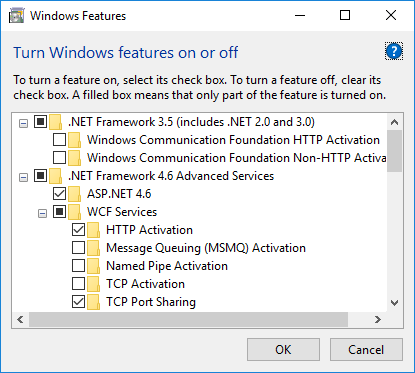
MikhailModeratorPlease make a screenshot of the Windows features.
March 30, 2020 at 3:23 pm in reply to: installation of Webstation application has completed with a error:Win8.1 #6661MikhailModeratorHello,
“Site Default Web Site not found” means something wrong with IIS. Please make a screenshot of your IIS administrator console.
MikhailModeratorMikhailModeratorHi,
I think, programming is not needed for this task.
There is a frame component included in Extra Scheme Components Plugin. It allows to insert a chart into a scheme. If this is what you need, I can provide more details. To discuss the existing features, it’s better to create a new topic in Understanding the Software subforum. -
AuthorPosts