Forum Replies Created
-
AuthorPosts
-
 MikhailModerator
is it expected to perform the same as on Raspberry Pi 4 Board
Yes.
MikhailModeratorHello,
Rapid SCADA 6 works on Raspberry Pi 3, 4 and 5.MikhailModeratorHi,
Make sure that the size of the scheme document is large enough to contain all components. Otherwise, there can be side effects.
https://ibb.co/mTZdnLzMikhailModeratorDear Marko,
Could you describe in more detail how this should work?MikhailModeratorHi,
By default, the Server service opens TCP port 10000. If it is used by another app, clients cannot connect. Check the TCP ports in use. If you have a clean virtual machine, it would be easier to try installing there.MikhailModeratorPassword here is encoded.
AutoAccept = true
ConfigFileName = DrvDsOpcUaServer.xml
DeviceFilter =
Password = B9D0F030265751578B00E9801C69320C
Username = opc
MikhailModeratorBy default
Username: opc
Password: scada
You can change them using the data source properties form.MikhailModeratorHi,
Possibly, a scheme size may be the cause of the issue. If your page is available online, I can check it.MikhailModeratorRedundancy is a big topic.
In short, you could deploy 2 Rapid SCADA servers that poll the devices in parallel independently. This would be the simplest way.More complex solution can synchronize data between 2 Rapid SCADA servers.
MikhailModeratorYou can create several archives, and assign archives to the channels.
MikhailModeratorHello,
Please provide additional info:
1. What Rapid SCADA version do you install?
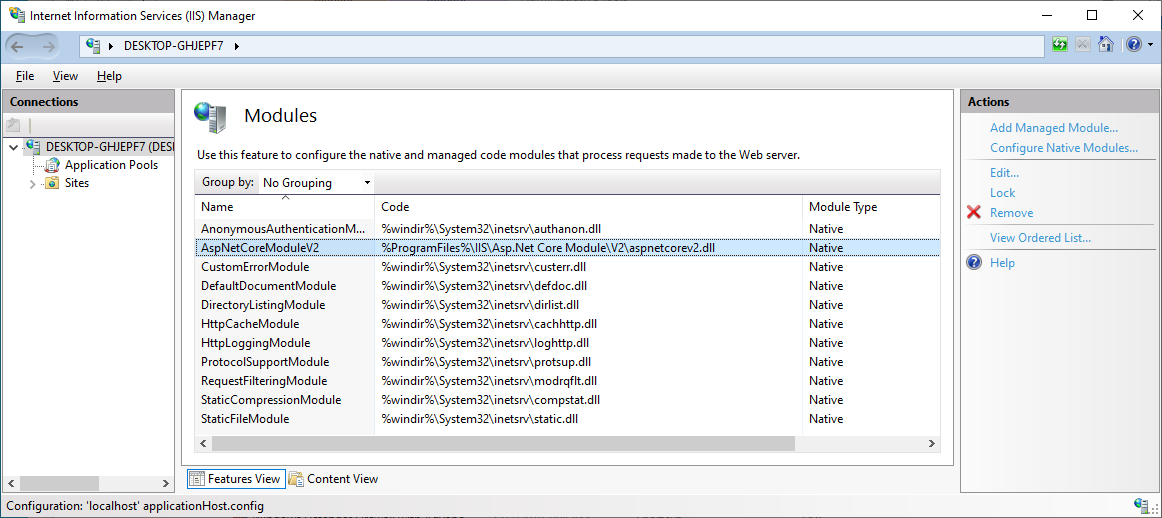
2. What is the OS version?Check that AspNetCoreModuleV2 is installed as shown here.
MikhailModeratorHi,
I recommend to check that AspNetCoreModuleV2 is installed:
https://rapidscada.net/docs/en/latest/installation/install-windows
The web application is executed by IIS, you should not be started manually.MikhailModeratorHi,
Can you reproduce this issue on https://rapidscada.net/scada/ ?
If your page is available online, I can check.MikhailModeratorHi,
You should check the web application log, ScadaWeb.log, for the details. -
AuthorPosts