Forum Replies Created
-
AuthorPosts
-
 MikhailModerator
Hi,
Please check this example.MikhailModeratorTry playing with the columnWidth attribute. It can help to make rows different heights. For example, two widgets with columnWidth=6.
-
This reply was modified 1 year, 1 month ago by
 Mikhail.
MikhailModeratorHi,
Currently, no. The aspect ratio is set for a dashboard, so width/height is the same for all widgets. I’ve added this issue to the backlog. If a row has less widgets, its height will be bigger, because the aspect ratio is a constant.
Nesting is not planned.MikhailModeratorHi,
No, because it is designed for historical data.
If you familiar with HTML and JavaScript, it’s possible to make a custom page and insert it in a dashboard.MikhailModeratorFor example,
<Location> <Name>Eiffel Tower</Name> <Descr>Avenue Anatole France, Paris, France</Descr> <Icon></Icon> <Lat>48.858222</Lat> <Lon>2.2945</Lon> <StatusCnlNum>104</StatusCnlNum> <DataItems> <DataItem cnlNum="101" /> <DataItem cnlNum="105">My text</DataItem> </DataItems> <Links> <Link viewID="2" /> <Link viewID="2">My link</Link> </Links> </Location>MikhailModeratorHi,
You can see it in Live Demo.
Blue marker is unbound, while green (or red) marker is bound to a channel.
Yes, a channel is needed to define marker status.MikhailModeratorHi,
Currently, a map view does not check access rights for each particular object.
Could you describe how your system is used? I’d like to imagine this case.MikhailModeratorHi,
The CurData widget can only display data as it is. This could be an idea for future development.
You could insert a table view as a widget if it solves the issue.MikhailModeratorHi,
I suppose, it should be possible to configure.
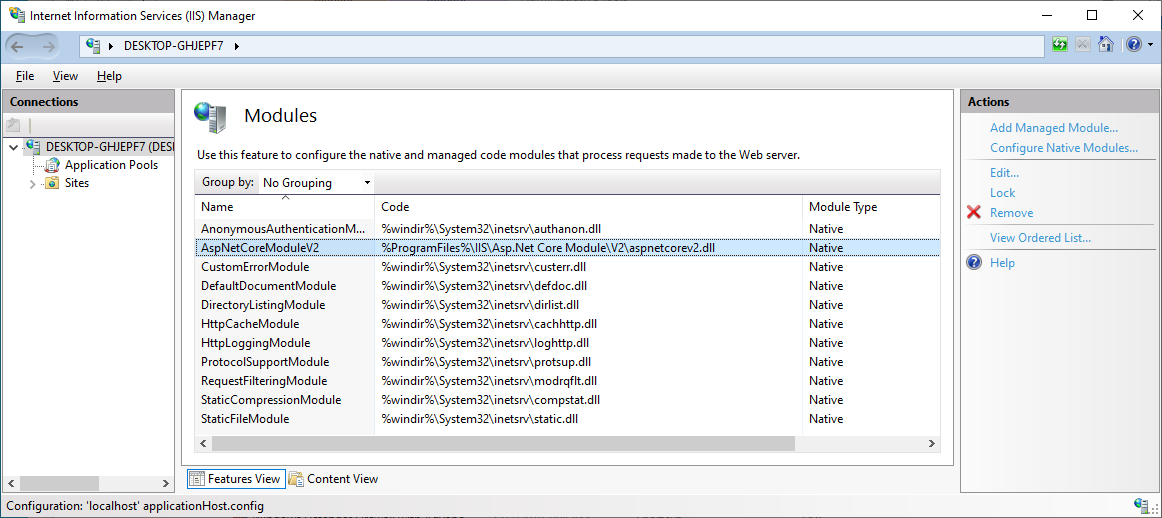
Could you check if AspNetCoreModuleV2 exists?
ImageMikhailModeratorSeptember 10, 2025
Fixed picture conditions.MikhailModeratorHi,
Thank you for the info.
If you open http://localhost on the ARM64 Windows machine, what do you get?MikhailModeratorCnl(101) is a mistake, use Val(101).
MikhailModeratorHi,
Currently no. The event list automatically scrolls down when new events appear.MikhailModeratorHi,
Could you provide screenshots?
Channels are related to objects. You can create an object and use it for all channels.MikhailModeratorSeptember 8, 2025
Set the image stretching again. -
This reply was modified 1 year, 1 month ago by
-
AuthorPosts