Forum Replies Created
-
AuthorPosts
-
January 19, 2026 at 12:58 pm in reply to: Regarding the issue of recalculation the “Calculated tags” #17575
 MikhailModerator
Source code:
CsvExport
CsvImport
ScadaTestClientMikhailModeratorHello,
I mean if we want to make working projects with tags (sensor input reading,plc,visualization,etc) it is not free anymore
Rapid SCADA still free and will remain so.
You can choose from Community (Free), Standard, Enterprise and Embedded Editions.
The comparison of editions is here.Windows 7 is not supported. It’s too old. For old hardware, it’s better to choose Linux than staying on Windows 7.
-
This reply was modified 8 months, 3 weeks ago by
 Mikhail.
January 16, 2026 at 1:47 pm in reply to: Regarding the issue of recalculation the “Calculated tags” #17566MikhailModeratorI meant that with CsvImport.exe you could write only the data points that are used by other channel to calculate their data. Maybe I misunderstood the task.
I can share the source code of those utilities if it helps.MikhailModeratorIn new mimics, it’s possible to enable and disable components depending on channel value.
If you use old schemes, you can reject commands as written above.
January 15, 2026 at 1:07 pm in reply to: Regarding the issue of recalculation the “Calculated tags” #17556MikhailModeratorIn that case CsvImport.exe can help. A user prepares a table containing historical data to upload.
MikhailModeratorThe existing API does not return a channel name. However, you could implement your own API to do that.
About the 2nd question:
Performconsole.log(dto)to check the object contents.January 14, 2026 at 1:44 pm in reply to: In Elastic Report I receive the error: Error loading report input options #17552MikhailModeratorHello,
Please provide screenshots of the corresponding settings in your project.January 14, 2026 at 1:43 pm in reply to: Regarding the issue of recalculation the “Calculated tags” #17551MikhailModeratorHello,
Entering channel value cannot be skipped. In that case, there is nothing to send to server.
To import a bunch of data, try the CsvImport.exe utility. It works based on a CSV file that can be prepared in Excel.January 13, 2026 at 1:49 pm in reply to: Regarding the issue of recalculation the “Calculated tags” #17545MikhailModeratorIs it enough to run ScadaTestClient and select option 12 – write historical data?
Try for 1 point and let us know about the result.
MikhailModeratorHello,
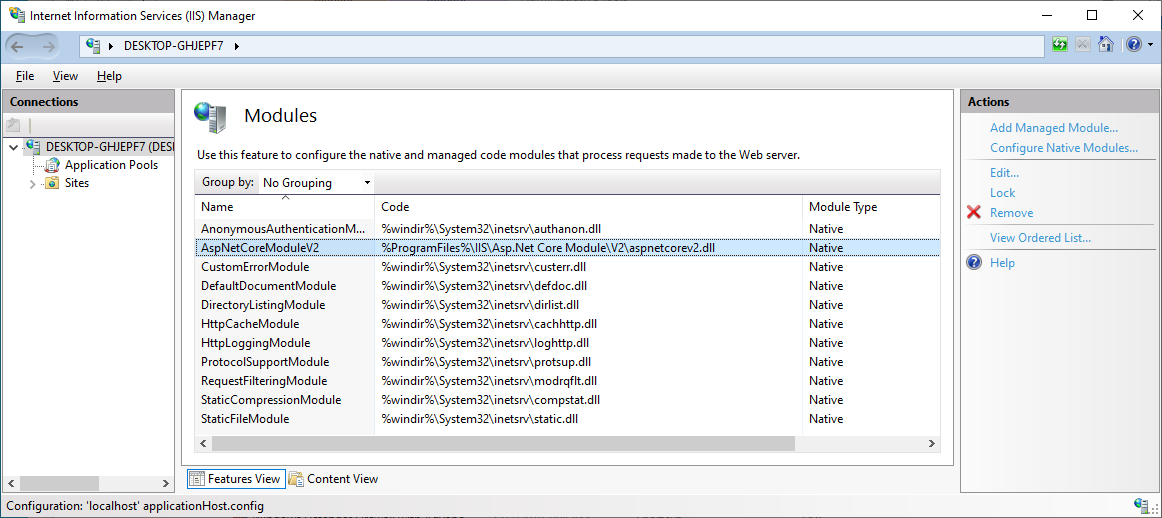
The issue is somewhere in IIS configuration.
Could you make a screenshot of your IIS management console?
Especially the modules section. ExampleJanuary 12, 2026 at 10:03 am in reply to: Regarding the issue of recalculation the “Calculated tags” #17539MikhailModeratorHello,
Thank you for your high rating.should I execute ScadaTestClient in the command prompt (cmd)?
Yes.
what is the correct syntax for calculating calculated tags (id 1009-1059) with time of 9:00-10:00?
I mean, that you should write a channel that is used by other calculated channels as a source.
After running ScadaTestClient.exe, select item 12.
Could you clarify how channel data were calculated?MikhailModeratorChannels and other tables of the configuration database will appear in different tables in the project database schema.
MikhailModeratorThanks for the information. I’ll be able to start testing and fixing it a little later.
MikhailModeratorIs there a way to make RapidScada store the Channel Name in the SQL database?
Yes. Create a new deployment profile, and set Extension to ExtDepPostgreSql. Set the parameters on the DB Connection tab.
When you deploy a project with that profile, it will be written to PostgreSQL.January 8, 2026 at 4:13 pm in reply to: Regarding the issue of recalculation the “Calculated tags” #17531MikhailModeratorHi,
If historical data is sent to the Server service having some timestamp, all calculated channel are recalculated at that timestamp.
To test it, use the ScadaTestClient utility.-
This reply was modified 9 months ago by Mikhail.
-
This reply was modified 8 months, 3 weeks ago by
-
AuthorPosts