Forum Replies Created
-
AuthorPosts
-
 MikhailModerator
Hello,
Could you clarify the question?MikhailModeratorIn ScadaServer.log, there is no connection made by the ScadaWeb user. It looks like the web application tries to connect to another TCP port. Open the connection options of the Webstation app using the Administrator app and check that the port 10000 is set there.
MikhailModeratorMake sure that the latest updates are installed on your Windows 11.
MikhailModeratorUsing the TcpView utility make sure that TCP port 10000 is not being used by any other application except the ScadaServer service.
MikhailModeratorPlease also provide ScadaServer.log
MikhailModeratorHi,
Thank you for the info.
Scada.Scheme.Editor.AppData.StartWcfService(System.String ByRef)
The above line means that the error occurred when starting a WCF service.
This discussion is related to the issue, but it does not contain a solution.
We are planning to get rid of WCF in Scheme Editor. Until then, I suggest using a virtual machine to create schemes.MikhailModeratorAccess to the log files is denied. Please make them public.
MikhailModeratorI see under the “Instance Status” it says webstation “Status not supported” Can it be relevant?
It’s not relevant. It just means that the app does not provide status.
I suggest to check events in Windows Event Viewer. If an app accidentally crashes, the OS writes some info there.Also try to deploy a new virtual machine using Hyper-V or VMware and install the editor from scratch.
MikhailModeratorHi,
Please provide a screenshot of the error by posting a link to Google Drive or other image hosting.
Also check the ScadaWeb.log and ScadaServer.log files.MikhailModeratorHello,
When the editor starts correctly, ScadaSchemeEditor.log contains
2025-03-25 12:50:42 <PC><user><ACT> Initialize common data of Scheme Editor
2025-03-25 12:50:42 <PC><user><ACT> Load components from files
2025-03-25 12:50:42 <PC><user><ACT> Components are loaded from the file C:\Program Files\SCADA\ScadaSchemeEditor\Web\bin\PlgSchBasicComp.dll
2025-03-25 12:50:43 <PC><user><ACT> WCF service is started
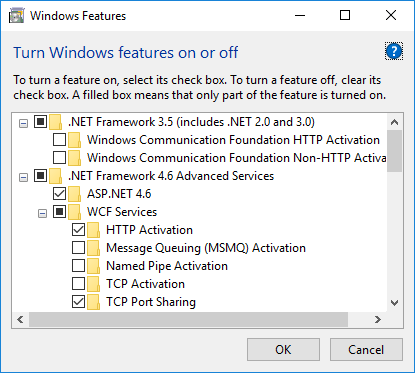
The editor uses WCF, so you may need to enable it as shown here.
The editor opens TCP port 10001. Using TcpView make sure that the port 10001 is not used by another application.
MikhailModeratorWhen an error occurs, the details are written in ScadaWeb.log. Please check the log file for additional info.
MikhailModeratorScadaWeb.log is OK.
Errors like “Dictionary file not found” are not critical.
What do you get when open http://localhost:10008/ in browser?Would you be able to explain the process of how the data from the Communication lines is transferred to the WebStation?
The Webstation app connects to the Server app using TCP port 10000 and requests data.
MikhailModeratorHi,
Screenshots of the settings and results would help to solve the issue.MikhailModeratorThe driver has been added to Store
https://rapidscada.net/store/Module/en/DrvParserTextJPMikhailModeratorHello,
Please open the browser tools (F12), select the Network tab, and make screenshots of the HTTP request details.
-
AuthorPosts