Forum Replies Created
-
AuthorPosts
-
 MikhailModerator
Hi,
Creating a web page view does not require any programming. Just add a row in the Interface table.Can we define for each individual parameter different axis
PlgChartPro.xml is a correct file name.
An individual axis for each channel is possible only if all channels has different quantities. Because an axis is chosen for a channel according to its quantity.MikhailModeratorIs there a solution to this problem on V5?
The issue is solved in the v6.
In the meantime, I suggest adding a column for “ratio”
Creating a function Ratio that makes linear calculation may be more clear. For example, channel formula would be
Ratio(0.5, 10)MikhailModeratorHi,
1. You can add a web page view to show a chart with predefined channels.
This is an example how to add a web page view.
Also I suggest to use Dashboard Plugin to easily display different charts.2. In Chart Pro configuration file (ChartPro.xml) you can define several Y-axes. Channels are bound to an Y-axis according to the channel quantity that should match the QuantityIDs parameter of the Y-axis.
If you have questions during the implementation, please provide screenshots of the settings and results.
-
This reply was modified 3 years, 9 months ago by
 Mikhail.
MikhailModeratorHi,
Channel data type should match datatype of a driver tag. The Modbus driver uses the double type for all tags.
64bit integer data type may be useful for long counters, because its max value is bigger than double.When I use “ export… ” to export channels to CSV files, and I have a coding problem If I use simplified Chinese in channel names
Please create a separate topic to discuss this issue in details and fix.
If you need a new simplified Chinese language pack, I’d be glad to do it.
That would help the project very much. Currently the phrases continue changing. After we release a stable 6th version, simplified Chinese translation would be appreciated.
-
This reply was modified 3 years, 9 months ago by Mikhail.
MikhailModeratorHi,
You could use a hardware relay. So you can play alarm signal independently from web browser.
Also you need a calculated channel that indicates that alarm is active. Automatic Control Module would send commands to control a relay depending on the channel value.MikhailModeratorThe Rapid SCADA 6 Beta 8 update has been released. The download link is at the beginning of the topic.
What’s new:
– Fixed bugs found in various applications and modules.
– Added options for table views, which, among other things, allow to set the displayed archive for a particular view.
– Added an archive option for the standard Chart Plugin. For example, in the address bar add …&archive=Hour
– The format description is displayed on the command sending form, if the format is string.
– The logic of Rapid Gate Module developed. The user interface of the module is partially ready.MikhailModeratorHow do I send a float value to the device?
Usually writing a float requires 0x10 Modbus function. Set the Multiple checkbox, specify data type, and try sending command without any formula.
If something goes wrong, provide logs and screenshots.MikhailModeratorChannel(101) > 65525 then it shows -1 otherwise it shows the actual value
Use the formula for the channel 101:
Cnl > 65525 ? -1 : CnlHow can we use custom Formulas in Rapid Scada
Check this article https://rapidscada.net/doc/content/latest/en/software-configuration/using-formulas.html
MikhailModeratorHello,
Do you need to display 65526 as -1?
MikhailModeratorDriver should be developed using .NET Framework. See the article for the details https://rapidscada.org/device-drivers-development/
MikhailModeratorHello,
What useful info is available in the module log files?MikhailModerator🙂
MikhailModerator…@ElasticRep
MikhailModeratorHi,
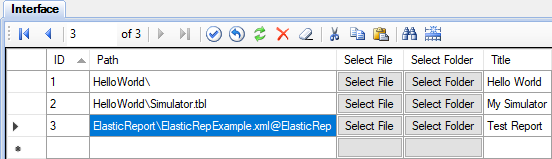
You have to define the view type in the Views table as shown here https://rapidscada.net/doc/content/latest/en/modules/plg-elastic-report-files/report_itf_tbl_en.png
-
This reply was modified 3 years, 9 months ago by
-
AuthorPosts