Forum Replies Created
-
AuthorPosts
-
 MikhailModerator
Hi,
1. You can add a web page view to show a chart with predefined channels.
This is an example how to add a web page view.
Also I suggest to use Dashboard Plugin to easily display different charts.2. In Chart Pro configuration file (ChartPro.xml) you can define several Y-axes. Channels are bound to an Y-axis according to the channel quantity that should match the QuantityIDs parameter of the Y-axis.
If you have questions during the implementation, please provide screenshots of the settings and results.
-
This reply was modified 4 years, 2 months ago by
 Mikhail.
MikhailModeratorHi,
Channel data type should match datatype of a driver tag. The Modbus driver uses the double type for all tags.
64bit integer data type may be useful for long counters, because its max value is bigger than double.When I use “ export… ” to export channels to CSV files, and I have a coding problem If I use simplified Chinese in channel names
Please create a separate topic to discuss this issue in details and fix.
If you need a new simplified Chinese language pack, I’d be glad to do it.
That would help the project very much. Currently the phrases continue changing. After we release a stable 6th version, simplified Chinese translation would be appreciated.
-
This reply was modified 4 years, 3 months ago by Mikhail.
MikhailModeratorHi,
You could use a hardware relay. So you can play alarm signal independently from web browser.
Also you need a calculated channel that indicates that alarm is active. Automatic Control Module would send commands to control a relay depending on the channel value.MikhailModeratorThe Rapid SCADA 6 Beta 8 update has been released. The download link is at the beginning of the topic.
What’s new:
– Fixed bugs found in various applications and modules.
– Added options for table views, which, among other things, allow to set the displayed archive for a particular view.
– Added an archive option for the standard Chart Plugin. For example, in the address bar add …&archive=Hour
– The format description is displayed on the command sending form, if the format is string.
– The logic of Rapid Gate Module developed. The user interface of the module is partially ready.MikhailModeratorHow do I send a float value to the device?
Usually writing a float requires 0x10 Modbus function. Set the Multiple checkbox, specify data type, and try sending command without any formula.
If something goes wrong, provide logs and screenshots.MikhailModeratorChannel(101) > 65525 then it shows -1 otherwise it shows the actual value
Use the formula for the channel 101:
Cnl > 65525 ? -1 : CnlHow can we use custom Formulas in Rapid Scada
Check this article https://rapidscada.net/doc/content/latest/en/software-configuration/using-formulas.html
MikhailModeratorHello,
Do you need to display 65526 as -1?
MikhailModeratorDriver should be developed using .NET Framework. See the article for the details https://rapidscada.org/device-drivers-development/
MikhailModeratorHello,
What useful info is available in the module log files?MikhailModerator🙂
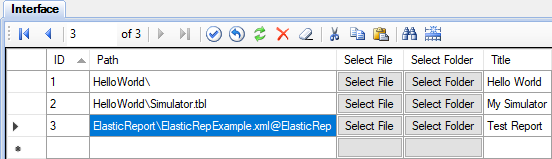
MikhailModerator…@ElasticRep
MikhailModeratorHi,
You have to define the view type in the Views table as shown here https://rapidscada.net/doc/content/latest/en/modules/plg-elastic-report-files/report_itf_tbl_en.png
MikhailModeratorHi,
By default, the module exports data when it comes from Communicator to Server. Calculated channels not included in this case.
To export all data, including calculated channels, you can use the archive upload feature of the module.July 4, 2022 at 9:32 am in reply to: How to set the number after the comma to 2 digits (Elastic Report)? #10400MikhailModeratorI guess, that the issue is related to Excel format. In the channel properties there are no decimals, but in the cell there are a lot of digits after decimal separator.
-
This reply was modified 4 years, 2 months ago by
-
AuthorPosts