Forum Home › Forums › Understanding the Software › Only Archive on “Status change”
- This topic has 37 replies, 2 voices, and was last updated 2 weeks, 3 days ago by
 Mikhail.
-
AuthorPosts
-
December 16, 2025 at 1:09 pm #17412
TroyV23
ParticipantHi,
I have a digital input logger device in the field that communicates with RapidScada via modbus, and currently I am polling the device to get updated status of each input “ON” or “OFF” but this creates a lot of wasted data.
A preferred, and more efficient method would be if the archive only contained time stamps when the input status changed, and what that status changed to.
For Example…
- Current setup:
Input0001 – ON – 10:00:01
Input0001 – ON – 10:00:02
Input0001 – ON – 10:00:03
Input0001 – ON – 10:00:04
Input0001 – OFF – 10:00:05
Input0001 – OFF – 10:00:06- Preferred Setup:
Input0001 – ON – 10:00:01
Input0001 – OFF – 10:00:05Is this possible to do inside Rapidscada?
I am currently archiving to an PostgreSQL database.Thanks in advance!
December 16, 2025 at 3:13 pm #17413 MikhailModerator
Hi,
Historical archives of the default type save data with fixed period.
To save data on change, enable PostgreSQL archives. They are disabled in the HelloWorld project. Archives can be found and configured in Instances – Default – Server – Archives.December 16, 2025 at 3:15 pm #17414MikhailModerator> I am currently archiving to an PostgreSQL database.
If so, just configure the archive options.December 16, 2025 at 3:15 pm #17415MikhailModeratorNote that you need some intermediate points to draw a chart.
December 16, 2025 at 9:02 pm #17416ParticipantThanks!
I will need up to seconds accuracy for the time-stamp of the status changes, how would I achieve that?
December 17, 2025 at 1:42 pm #17419MikhailModeratorYou can mix periodical writing and writing on change. If you published a screenshot of the archive options, I could advice.
Also I suggest to enable events for those channels.December 23, 2025 at 4:25 pm #17460Participant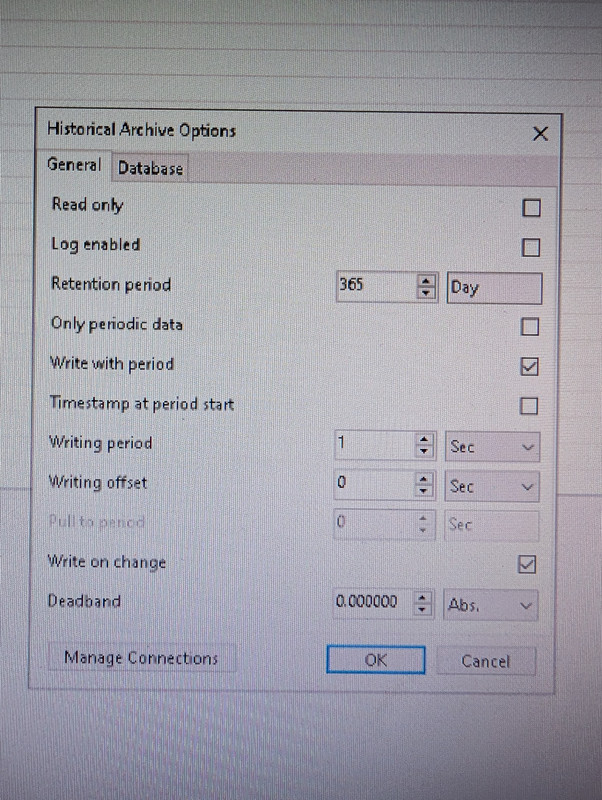
These are the archive settings I chose, but unfortunately it’s still creating periodic logs every second which is too much data.
If I remove the “write with period” setting. How often will the device be checked for changes?
Also, side question. Is there a quicker way of editting multiple channels because I find myself having to edit hundreds of lines manually with every change I do. I can select multiple rows but it doesn’t let me edit them simultaneously.
Thanks!
December 24, 2025 at 11:02 am #17464MikhailModeratorIf you untick “Write with period”, the archive will write data only when it changes.
> Is there a quicker way of editting multiple channels
Method 1
1. Optionally filter the channels in the table.
2. Use the replace feature (Ctrl + F).Method 2
Edit a table in XML. Then reload the configuration database.January 5, 2026 at 7:38 pm #17520ParticipantIf you untick “Write with period”, the archive will write data only when it changes.
How often does rapidscada check for changes? Is it every second?
2. Use the replace feature (Ctrl + F).
How do you find & replace when the cell is blank? I wasn’t able to make that work for me.
Thank you so much for the assistance!
January 6, 2026 at 8:01 am #17522MikhailModeratorHow often does rapidscada check for changes? Is it every second?
Approximately 10 times a second.
How do you find & replace when the cell is blank?
I think, this is not possible.
January 6, 2026 at 5:54 pm #17526ParticipantThanks Mikhail, I have the archive working properly now.
Is there a way to make RapidScada store the Channel Name in the SQL database? Seems it only stores the Channel number.
January 8, 2026 at 4:15 pm #17533MikhailModeratorIs there a way to make RapidScada store the Channel Name in the SQL database?
Yes. Create a new deployment profile, and set Extension to ExtDepPostgreSql. Set the parameters on the DB Connection tab.
When you deploy a project with that profile, it will be written to PostgreSQL.January 9, 2026 at 6:33 pm #17535ParticipantI’ve made the new profile, uploaded config with the new settings successful.
However, the Historical table still does not contain the Channel name column, only channel number.
And advice to make this column?
January 12, 2026 at 9:55 am #17538MikhailModeratorChannels and other tables of the configuration database will appear in different tables in the project database schema.
January 13, 2026 at 5:26 pm #17546ParticipantChannels and other tables of the configuration database will appear in different tables in the project database schema.
Is it possible to get the channel name through the API ?
-
AuthorPosts
- You must be logged in to reply to this topic.