Forum Replies Created
-
AuthorPosts
-
 MikhailModerator
First of all, try sending command from the device data page (in Communicator settings). Provide screenshots if it doesn’t work.
MikhailModeratorHi,
With DrvHttpNotif you can send any parameters using GET or POST request.
You should send a command having the code Request and text like
grp=value1
value=value2MikhailModeratorHello,
Yes, there is ModDbExport module in v6. The module was upgraded and improved.MikhailModeratorHi,
An addition to the above answer: to display a link as a button, set borders and background color if needed.MikhailModeratorIf your company (or client) uses Active Directory, it’s possible to integrate it with Rapid SCADA and manage users by Active Directory tools.
-
This reply was modified 2 years, 6 months ago by
 Mikhail.
MikhailModeratorHi,
The option to assign a user management plugin is created for future use. The plugin itself has not been developed yet. We will develop it in the future.MikhailModeratorHow did you solve this issue?
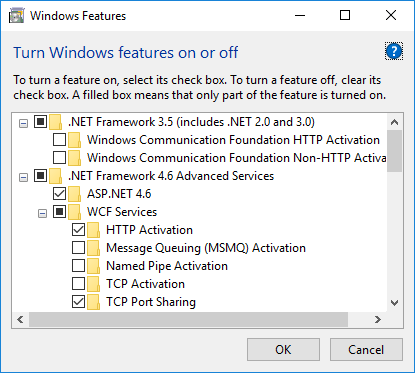
MikhailModeratorScheme Editor requires WCF to be installed. Check the Windows features as shown here.
MikhailModeratorCould you copy communication line log here?
MikhailModeratorPossible reason is that Communicator works as a service while another app is a desktop application.
You can try setting username, password and domain in the connection parameters of the OPC device.
What is OPC DA specification version?
What is the OPC server you try to connect?-
This reply was modified 2 years, 6 months ago by Mikhail.
MikhailModeratorThank you for the info.
MikhailModerator🙂
-
This reply was modified 2 years, 6 months ago by
-
AuthorPosts