Forum Replies Created
-
AuthorPosts
-
 MikhailModerator
Good 🙂
MikhailModeratorHi,
Check that the TCP port 161 is open for incoming connections on the server’s firewall.MikhailModeratorAnd you should write the results after changing something in the system to understand which approaches work.
MikhailModeratorAlso, set all data and log folders in C:\SCADA folder as exception for anti virus system, because it checks every file after every change.
MikhailModeratorI’m not sure, but may be MQTT is not very fast communication protocol. To compare, try the Modbus example and measure how many messages you can receive per second.
MikhailModeratorHi,
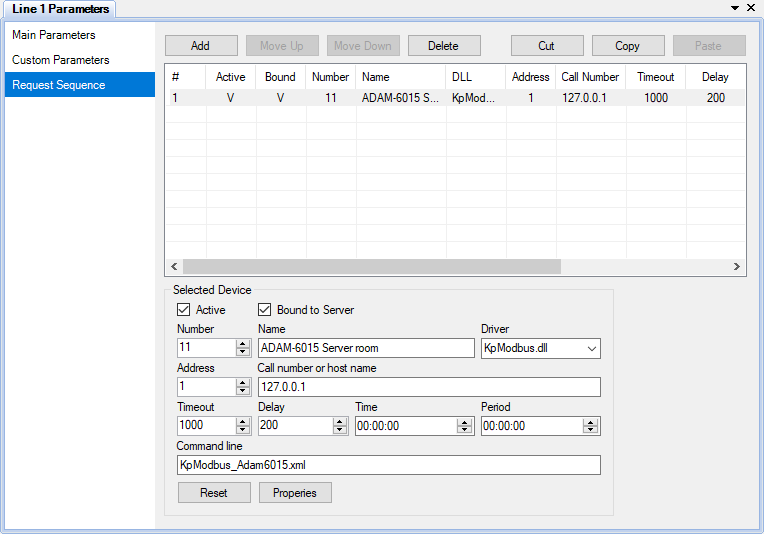
Try decreasing the delay parameter for the device in Communicator.
It’s here http://rapidscada.net/doc/content/latest/en/software-configuration/communication-with-devices-files/comm_line_req_en.png
This should increase polling rate.MikhailModeratorAre there changes in performance if you install Rapid SCADA and MySQL to a physical machine?
MikhailModeratorHello,
If you install another OPC server, can you see them in the list?
BrowseOPC utility can be useful.
Its source code.MikhailModeratorOK )
MikhailModeratorHi,
You should use ScadaAdmin user to connect. Check that ScadaAdmin exists in the Users table.
MikhailModeratorIn RPi find the file /opt/scada/ScadaAgent/Config/ScadaAgentConfig.xml
The secret key in the file must be the same as the secret key in the configuration profile.In Administrator you should export the User table to user.dat and copy to /opt/scada/BaseDAT
To get more info about error, see /opt/scada/ScadaAgent/Log/ScadaAgent.log
MikhailModeratorIn this case, it’s better to set View ID property of the link than URL.
MikhailModeratorHi,
I think, you should use real physical machine, because performance of a virtual machine is unpredictable.What database model do you use?
Please create a different topic to discuss MQTT. One subject is a one topic.
MikhailModeratorIn Rapid SCADA v5.8 it’s easy to transfer the configuration.
You should create a new deployment profile in Administrator. Set RPi’s IP address and other profile parameter. Then upload the configuration to RPi. Don’t forget that in Linux you need different directories for SCADA-Server. Before switching from Windows to Linux, change the directories in Server configuration (using Administrator).MikhailModeratorHi,
Agree this is a useful feature. We keep it in mind.
Now it works only for the Button component. -
AuthorPosts