
Forum Replies Created
-
AuthorPosts
-
TroyV23
ParticipantI’ve made the new profile, uploaded config with the new settings successful.
However, the Historical table still does not contain the Channel name column, only channel number.
And advice to make this column?
ParticipantThanks Mikhail, I have the archive working properly now.
Is there a way to make RapidScada store the Channel Name in the SQL database? Seems it only stores the Channel number.
ParticipantIf you untick “Write with period”, the archive will write data only when it changes.
How often does rapidscada check for changes? Is it every second?
2. Use the replace feature (Ctrl + F).
How do you find & replace when the cell is blank? I wasn’t able to make that work for me.
Thank you so much for the assistance!
Participant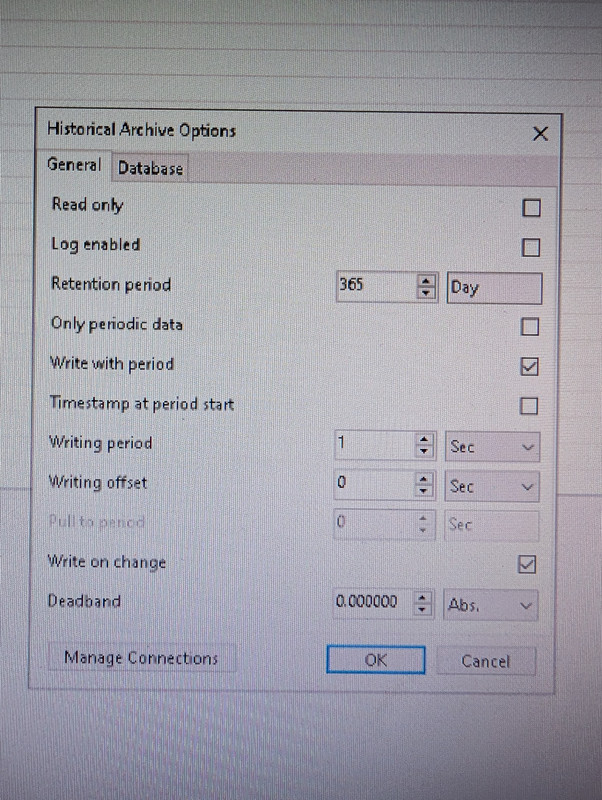
These are the archive settings I chose, but unfortunately it’s still creating periodic logs every second which is too much data.
If I remove the “write with period” setting. How often will the device be checked for changes?
Also, side question. Is there a quicker way of editting multiple channels because I find myself having to edit hundreds of lines manually with every change I do. I can select multiple rows but it doesn’t let me edit them simultaneously.
Thanks!
ParticipantThanks!
I will need up to seconds accuracy for the time-stamp of the status changes, how would I achieve that?
ParticipantAdd your own type by analogy ON-OFF by specifying On: blue, Off:yellow for example
This worked perfectly! Thank you 🙂
ParticipantOn the “Table” view, can I customize the colour of the states “ON” and “OFF” ?
Right now ON is green, and OFF is red. How Do I use other colours?
ParticipantI discovered the issue was that my minute archive was not set to active. The chart is populating fine now!
ParticipantI updated to latest version 6.2.1
The reports function is now working, but charts are still blank.Where can I access the Chart configuration?
ParticipantI have still been unable to get my chart to display any lines of data, I open the Channel and the Chart is blank. The table populates data just fine, but the reporting function also has an issue.
When I try and generate a report, it says I have no channels in the drop down
ParticipantI reversed the conditions, it works now 🙂
ParticipantI now have the On-Off condition working but I realized it broke my LED scheme component condition. How do I make the LED indicator condition show green when no alarm, and red when alarm is on.
The condition options have to be numbers, and that doesn’t work anymore.Thanks in advance!
ParticipantInput formula would be Cnl > 0 ? 0 : 1
Format is Off-OnThanks!
That worked perfectly, I just had to make a custom format to reverse the “Off-On” to “On-Off”.ParticipantI was able to get it working, my device actually had a modbus register that defined everything for me.
I still have a question though:
I have an alarm channel that either shows “0” when alarm is OFF or “256” when alarm in ON. When the event shows it gives a generic description that is not useful for users. Is there a way for me to define what the event says?
I also want a formula to show “1” instead of “256” when alarm in ON.
Participant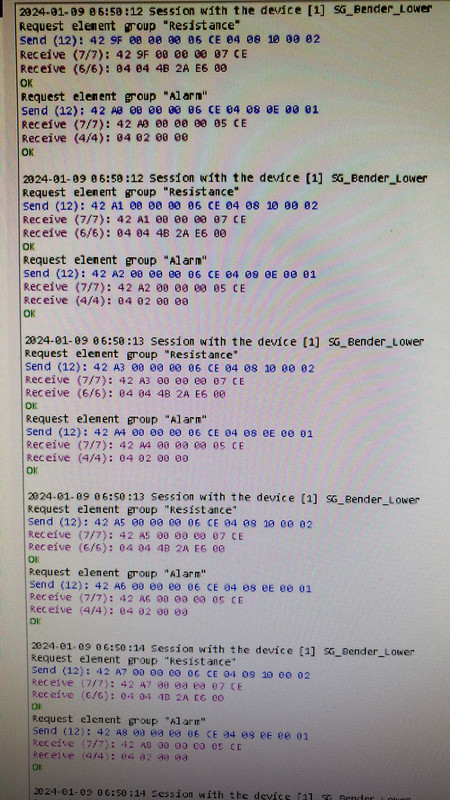
-
AuthorPosts