Forum Replies Created
-
AuthorPosts
-
TroyV23
ParticipantI have updated to latest version and I’ve found the source of the issue.
The value of the bit is not changing but the status of the bit is changing which causes a “write” entry even when the value of the bit has not changed. I get many of these status changes which causes this issue.
Is there a way to ignore status, and only write on “value” change?
ParticipantThis is with the same settings you’ve shown above:
https://www.imghippo.com/i/nKU4907dgo.pngShould I update my version of rapidscada maybe? Currently running v6.2.2
Participant1. Is there a chance that they are written when Server restarts? What can be the cause of writing?
I tested restarting the server but it did not trigger any new entries.
2. If the channel value changes, is it written to the archive
Yes, the when the value of a bit goes from OFF/ON or ON/OFF it does write to archive, but there are also additional writes in between, and I’m getting multiple ON writes in a row.
3. Tick “Log enabled” checkbox. What would be in the archive log file?
The log looks like this:
2026-08-20 10:41:02 Data queue has become empty
2026-08-20 10:41:02 Enqueueing of 1 data points completed successfully in 0 ms
2026-08-20 10:41:02 Data queue has become empty
2026-08-20 10:41:03 Enqueueing of 1 data points completed successfully in 0 ms
2026-08-20 10:41:03 Data queue has become empty
2026-08-20 10:41:03 Enqueueing of 2 data points completed successfully in 0 ms
2026-08-20 10:41:03 Data queue has become empty
2026-08-20 10:41:03 Enqueueing of 3 data points completed successfully in 0 ms
2026-08-20 10:41:03 Data queue has become empty
2026-08-20 10:41:03 Enqueueing of 1 data points completed successfully in 0 ms
2026-08-20 10:41:03 Data queue has become empty
2026-08-20 10:41:03 Enqueueing of 1 data points completed successfully in 0 ms
2026-08-20 10:41:04 Data queue has become empty
2026-08-20 10:41:04 Enqueueing of 1 data points completed successfully in 0 ms
2026-08-20 10:41:04 Data queue has become empty
2026-08-20 10:41:04 Enqueueing of 1 data points completed successfully in 0 ms
2026-08-20 10:41:04 Data queue has become empty
2026-08-20 10:41:04 Enqueueing of 2 data points completed successfully in 0 ms-
This reply was modified 1 month, 2 weeks ago by
TroyV23.
ParticipantYou guys were both correct, it was actually 32 bits and the documentation was wrong. It’s reading correctly now.
ParticipantParticipantTry this link:
https://freeimage.host/i/CPNESqJ
-
This reply was modified 1 month, 3 weeks ago by
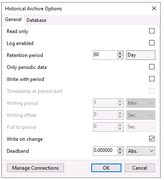
ParticipantHere is the current archive config:
https://i.postimg.cc/rKg71cVM/Screenshot-2026-08-12-161747.png
configHere is a sample output using the API:
https://i.postimg.cc/svKbYyj3/Screenshot-2026-08-12-162904.png
outputThere are repeated entries here all in OFF state which should not trigger more than once. I have another data logger running and confirmed the status has not changed in this time.
I am wondering if another channel changes value, are all others re-checked even if they did not change?
-
This reply was modified 1 month, 3 weeks ago by
 Mikhail.
ParticipantI have a custom Historical archive configured to write on change, and periodic is not checked. IT is working most of the time, but sometimes I see some glitches.
The communication line I’m polling has about 10 devices, each with about 100 digital inputs. I made a custom historical archive so that only status changes OFF-ON or ON-OFF will generate a database entry. For some reason I still get certain inputs with multiple ON status in a row. What can cause this?
Participant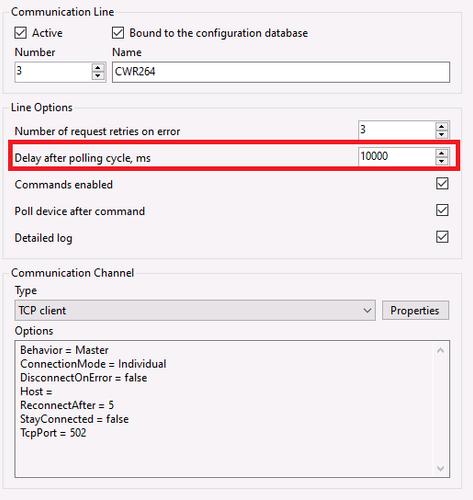 Participant
[img]https://i.imghippo.com/files/U9965lM.png[/img]
Is this ok?
-
This reply was modified 3 months, 3 weeks ago by
ParticipantIs this possibly an issue?
https://iili.io/CCFzeCg.md.png
-
This reply was modified 3 months, 3 weeks ago by Mikhail.
ParticipantThis is how it is set up right now:
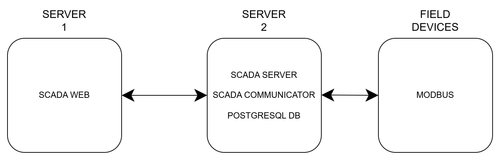
Running Windows Server 2019 (x64) on Web server, and 2022 (x64) on the Application Server.
ParticipantI’ve made my own custom html using the API and a imported CSV to fill channel names which is working really well now.
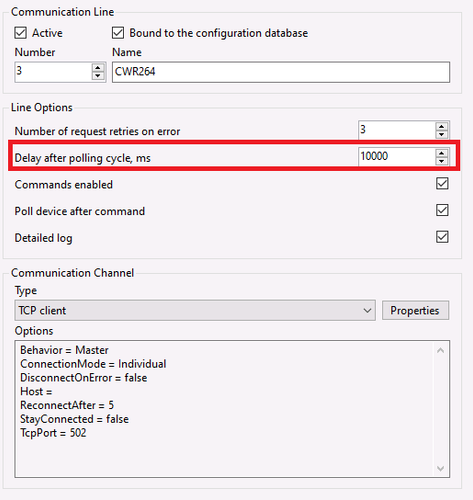
The problem I’m still having is the polling timing, even though I have it configured to write on change, you said it should be checking status approx. 10 times a second.
My data shows it is only checking approx. every 102 to 105 seconds for changes, and then it posts a whole bunch of “changes” with identical time stamps, when in reality those events all took places many seconds apart.
Any idea what can cause this delay for checking on change status?
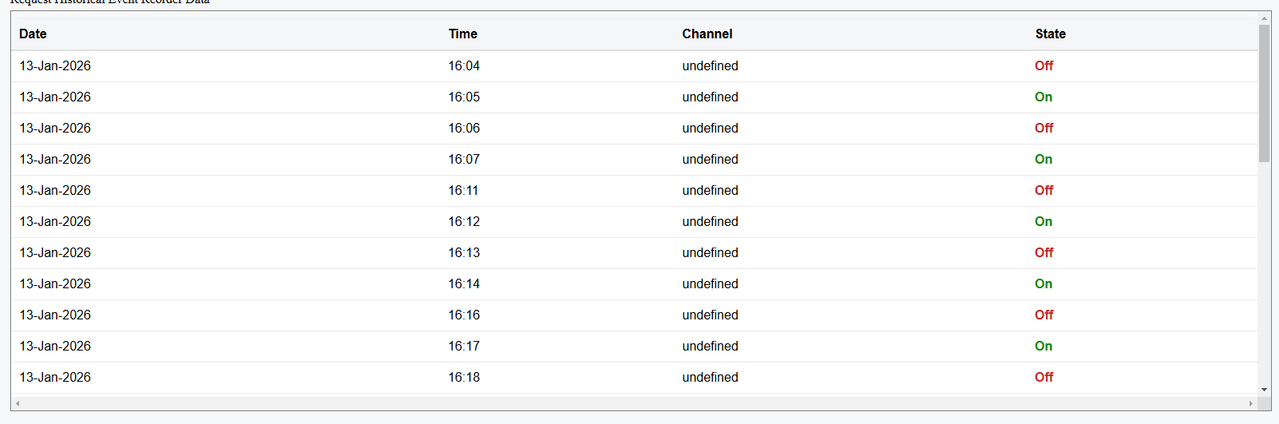
ParticipantIm attempting a different path, so I’ve created this feed using the API:
https://i.postimg.cc/sxZ2X3B3/tmp-1de38a8b-3926-45a1-9bc3-bfc23f60969d.png
I am not able to display the channel number it always displays as undefined.
mainApi.getHistData(ARCHIVE_BIT, timeRange, “55500-55508”, function (dto) {
let outElem = $(“#divData2”);if (dto.ok) {
outElem.html(“”);
let timestamps = dto.data.timestamps;if (timestamps.length > 0) {
let trend = dto.data.trends[0];
let table = $(“<table></table>”);
table.append(“<tr><th>Date</th><th>Time</th><th>Channel</th><th>State</th></tr>”);for (let i = 0; i < timestamps.length; i++) {
let timestamp = timestamps[i];
let record = trend[i];
let state = record.df.dispVal;
let channel = record.cnlNum;// Only show On/Off
if (state !== “On” && state !== “Off”) continue;let dt = new Date(timestamp.lt);
let day = String(dt.getDate()).padStart(2, “0”);
let month = dt.toLocaleString(“en-US”, { month: “short” });
let year = dt.getFullYear();let hours = String(dt.getHours()).padStart(2, “0”);
let minutes = String(dt.getMinutes()).padStart(2, “0”);let dateStr =
${day}-${month}-${year};
let timeStr =${hours}:${minutes};// Pick CSS class
let stateClass = state === “On” ? “state-on” : “state-off”;table.append(
`<tr>
<td>${dateStr}</td>
<td>${timeStr}</td>
<td>${channel}</td>
<td class=”${stateClass}”>${state}</td>
</tr>`
);ParticipantChannels and other tables of the configuration database will appear in different tables in the project database schema.
Is it possible to get the channel name through the API ?
-
This reply was modified 1 month, 2 weeks ago by
-
AuthorPosts